cnMaestro MarketApps

From “By the time I set it up, it’s gone” to “Fixed it from here.”

An app hub inside cnMaestro that puts deep diagnostics one click away, right where the problem lives, plus certified apps for industries like senior living and MDUs.

cnMaestro MarketApps
My Role
Led UI/UX for the marketplace and its diagnostic tools
Team
Lead UI/UX Designer (me), cnMaestro engineering, Product management, NOC operators and MSP engineers, Field technicians
Timeline
16 weeks from discovery to production rollout (2025)
Outcome
A two-tier marketplace with contextual, zero-setup diagnostics, inside cnMaestro

The short version · 30-second read

The problem
The console had the data, but not the tools.
What I did
  • Ran field discovery with NOC operators, MSP engineers and field technicians
  • Defined the two-tier taxonomy, permissions and in-context launch points
The result
  • 60% faster mean time to resolution
  • 320% increase in diagnostic tool use
  • 85% of channel contention tickets solved remotely
01 / Overview

Overview

What is MarketApps?

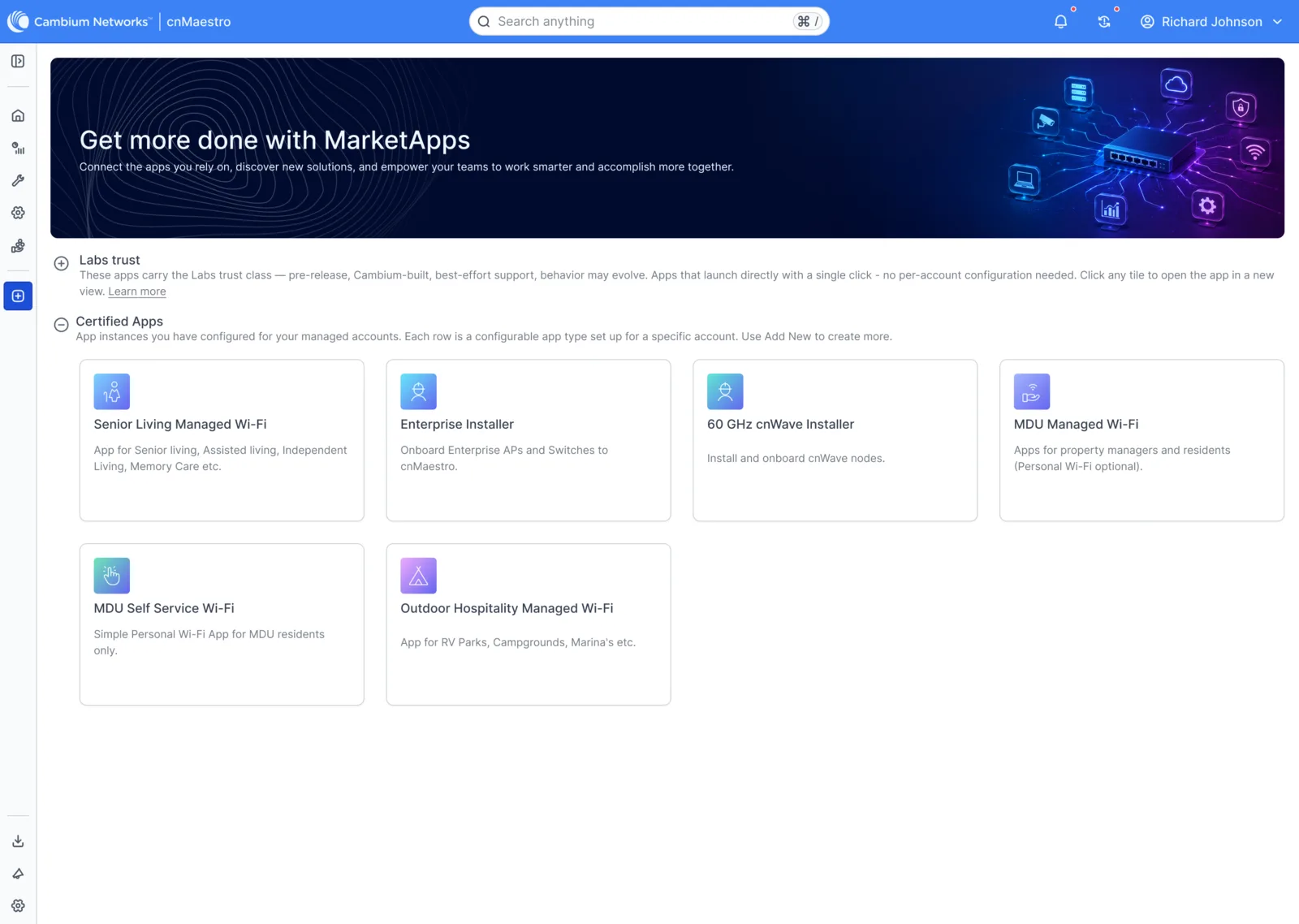
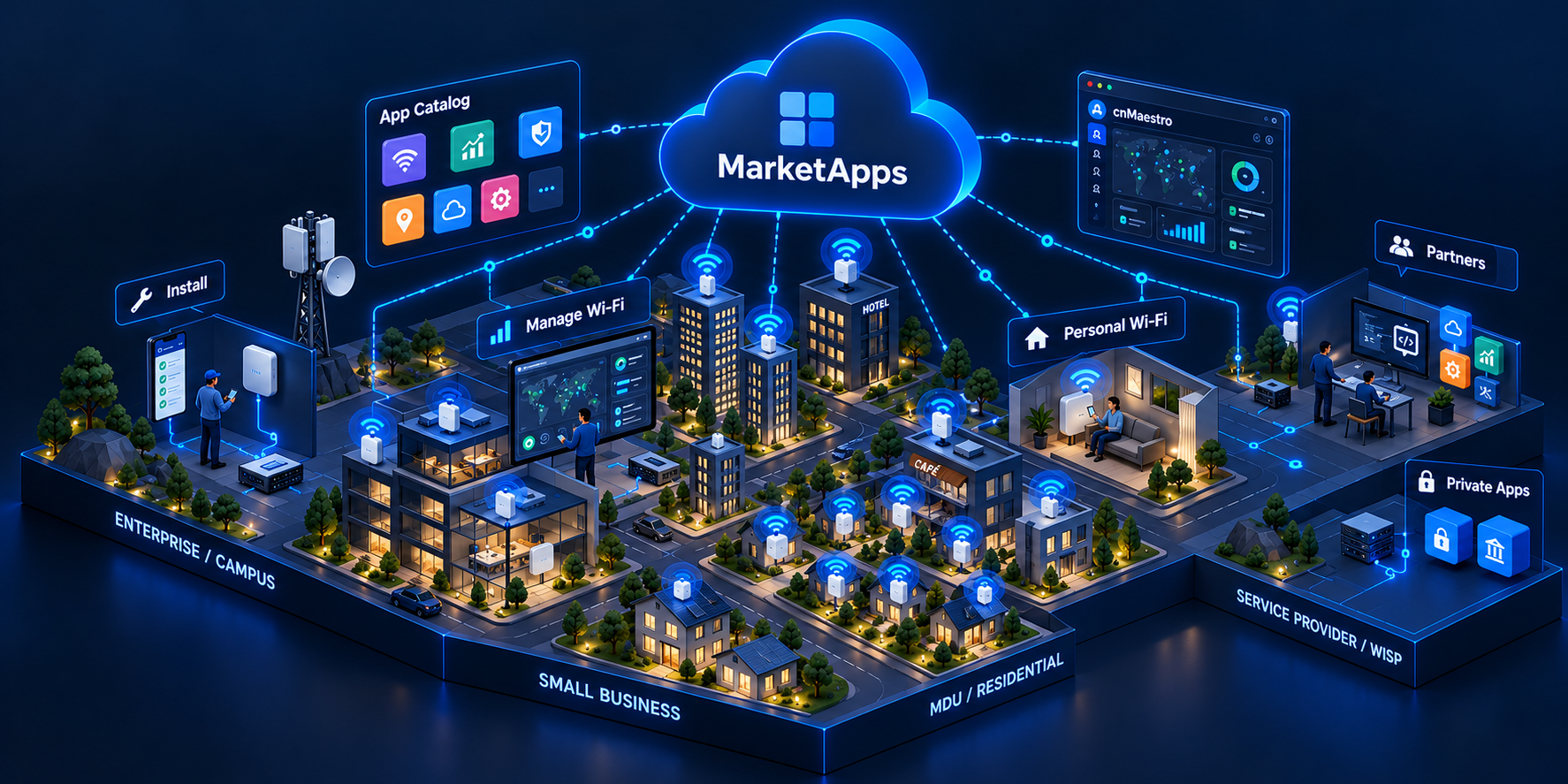
MarketApps is the app hub inside cnMaestro. It has two tiers: Certified Apps, verified turnkey solutions for industries like senior living and MDUs, and Labs tools, zero-setup diagnostics that run in the browser: site topology, a tri-band Wi-Fi channel analyzer, ConfigAudit and remote packet capture.

Why design it?

The console had the data, but not the tools. To diagnose a problem, engineers jumped between the cloud dashboard, SSH terminals, desktop Wireshark and standalone spectrum analysers, or sent someone to site. Setup wizards were so heavy that many tools were abandoned before they were used, and every hour of setup was an hour the network stayed broken.

My role

  • Led UI/UX for the marketplace and its diagnostic tools
  • Ran field discovery with NOC operators, MSP engineers and field technicians
  • Defined the two-tier taxonomy, permissions and in-context launch points
  • Designed high-density visualisations for topology, spectrum, audits and packets
  • Created the Lite Agentic Design System so AI-built apps stay on-system
Team
  • Lead UI/UX Designer (me)
  • cnMaestro engineering
  • Product management
  • NOC operators and MSP engineers
  • Field technicians
Outcome
A two-tier marketplace with contextual, zero-setup diagnostics, inside cnMaestro
02 / Problem & Opportunity

Problem & Opportunity

The problem

The console had the data, but not the tools. Engineers lost time to setup and site visits, and the platform team couldn’t open cnMaestro up without risking stability, privacy or consistency.

Network engineers
  • Setup wizards made engineers give up on tools
  • RF interference needed on-site analysers and a truck roll
  • Diagnostics weren’t in the context of the site or device
  • Too many tools: dashboard, SSH, Wireshark, spectrum analyser
Security & platform teams
  • Audits risked exposing credentials to cloud APIs
  • Industry solutions needed custom installs and API keys
  • Custom apps built with AI each looked different
  • Mission-critical networks can’t afford unstable extensions

The opportunity

How might we put deep diagnostics one click away from the problem, without making a mission-critical platform unstable?

For network engineers
  • Instant tools, launched in context, with zero setup
  • Remote spectrum and packet analysis instead of truck rolls
  • Answers in seconds, while the issue is still happening
For security & platform teams
  • Governed, certified apps kept separate from instant tools
  • Sensitive configs that never leave the browser
  • AI-built apps that look and behave like cnMaestro
03 / Discovery & Research

Discovery & Research

Where we started

The moment: a ticket comes in during an outage.

  • Students in a dorm report slow Wi-Fi
  • cnMaestro shows the site, but not why
  • The spectrum analyser is in a van, two hours away
  • Packet captures mean a laptop on site
  • By the time the tools are set up, the issue is gone

The ask sounded simple: add diagnostic tools to the console, support industry solutions, let partners build apps, and keep the platform stable. Underneath was a real tension, mission-critical stability vs. instant agility, and one model couldn’t satisfy both. That outage became the lens for the whole project.

What we did to dig deeper

3

Weeks of discovery

Interviews across NOC, MSP and field roles, mapping every step from noticing a problem to diagnosing it.

3

User groups

NOC operators, managed service engineers and field technicians.

2

App tiers

Certified Apps for industries; Labs tools for instant diagnostics.

16

Weeks to production

From research to multi-site rollout, validated with thousands of endpoints.

What we heard

“By the time I set it up, the issue is gone.”
“I need a spectrum analyser, not another ticket.”
“Our configs can’t leave the building.”
“Why do I need four tools to check one site?”
“Every app the team builds looks different.”
“Can we fix this before anyone drives out?”

Insights that changed the brief

Two operating modes kept surfacing:

  • Firefighters

    Need a diagnostic right now, in the context of one site or device.

  • Planners

    Want governed, account-wide solutions for an industry.

This split became the two-tier marketplace.

Labs tools

Zero setupOne clickIn contextInstant results

Certified Apps

VerifiedAccount-levelIndustry-specificGoverned

Themes from affinity mapping

Notes from NOC, MSP and field interviews fell into two groups: the jobs the marketplace had to do, and the truths about how operations teams actually work.

Product tasks & features

App catalogCertified AppsLabs toolsTrust labelsIn-context launch pointsSite topologyWi-Fi channel analyzerConfigAuditPacket captureVertical appsAgent guides

Product insights

Setup kills adoptionFirefighters vs plannersTruck rolls for remote problemsConfigs can’t leave the buildingContext beats navigationAI output drifts without guardrails

Insights that shaped the design

01

Insight 1: Setup killed adoption

If a tool needs setup, nobody uses it in an outage. Make it one click, in context.

02

Insight 2: Stability and agility need different homes

Certified Apps for governed solutions; Labs tools for instant diagnostics.

03

Insight 3: Configs can’t leave the building

Evaluate compliance rules locally, in the browser.

04

Insight 4: Speed shouldn’t cost consistency

AI-built apps need the design system in a form agents can read.

04 / Personas

Personas

Meet the people

Arjun (NOC engineer · Firefighter)

Arjun, a NOC engineer who needs answers during an outage

Age
31
Occupation
NOC engineer
Location
Hyderabad, India
Tech comfort
Expert
“During an outage, every wizard step is a minute lost.”

Who

  • Watches hundreds of sites from cnMaestro
  • First to hear when a site goes wrong
  • Comfortable with RF, packets and CLI

Wants

  • A diagnostic right now, for this site or device
  • To see interference without a spectrum analyser on site
  • Packet captures without a laptop sniffer

Frustrated

  • Setup wizards between him and the answer
  • Jumping between the dashboard, SSH and Wireshark
  • Truck rolls for problems he could see remotely
Arjun’s outage, before

An hour of setup for a five-minute problem: for Arjun, a fix that arrives too late; for the business, a truck roll that didn’t need to happen.

calmstressed
  1. Ticket comes in

    “Wi-Fi is slow in the dorm”

  2. Open cnMaestro

    The data is there; the tools aren’t

  3. SSH and Wireshark

    Separate tools, separate logins

  4. Setup wizard

    Account-level configuration first

  5. Send a technician

    Interference needs an analyser on site

  6. Issue is gone

    Nothing left to diagnose

05 / Design Strategy

Design Strategy

We wanted the answers to sit where the problem lives. More tools wasn’t the goal: the goal was to make cnMaestro extensible without making it unstable.

North star

“Give every engineer deep diagnostics one click away, right where the problem lives, and every industry a governed app they can trust.”

Design principles

  1. 01

    Zero setup.

    If it needs setup, nobody uses it in an outage.

  2. 02

    In context.

    Launch from the site or device you’re already looking at.

  3. 03

    Trust is visible.

    Clear labels separate certified apps from Labs tools.

  4. 04

    Private by default.

    Sensitive configs are checked in the browser and never leave it.

  5. 05

    On-system by default.

    Apps built by teams or AI agents share the same design system.

Design directions

A two-tier marketplace: Certified Apps for governed industry solutions, Labs tools for instant diagnostics

Diagnostics that travel instead of technicians: remote spectrum and packet analysis

A Lite Agentic Design System so AI-built apps look and behave like cnMaestro

Key pivots

Setup wizards

Zero-config Labs tools

If it needs setup, nobody uses it in an outage.

One model for every app

Two tiers: Certified and Labs

Stability and agility, each where it belongs.

Truck rolls

Remote spectrum and packet analysis

The fix should travel, not the technician.

Ad-hoc AI-built UIs

A Lite Agentic Design System

Speed shouldn’t cost consistency.

What engineers expect each tool to do

For every tool we mapped what the engineer expects it to do, not just what data it shows. Tap a module to see its expectation map.

What “Site topology” has to do

  • Map the site from core gateways to access points and clients
  • Toggle port overlays and Wi-Fi networks
  • Collapse switch stacks to save space
  • Trace a troubled endpoint in seconds
06 / Information Architecture

Information Architecture

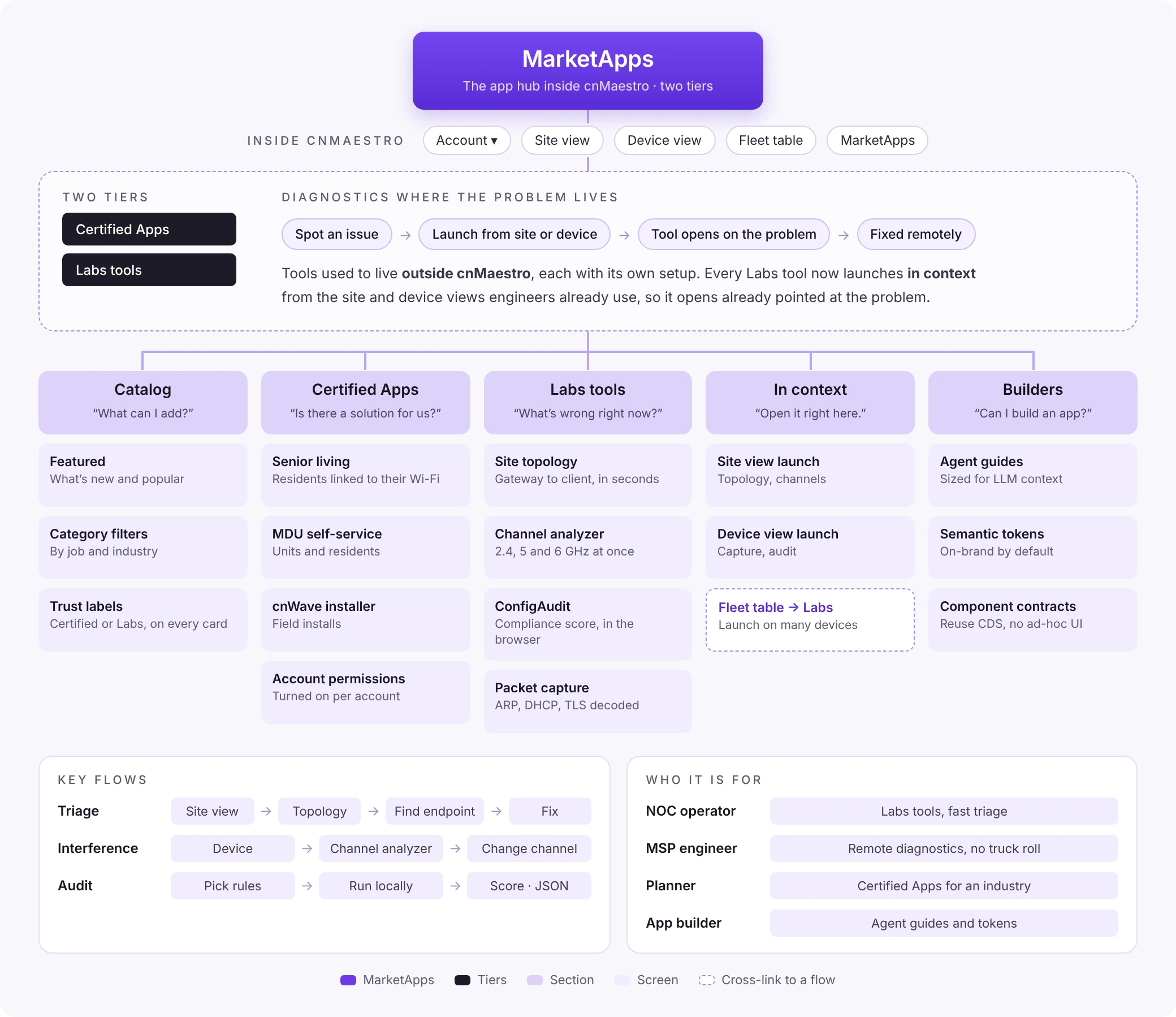
Tools used to live outside cnMaestro, each with its own setup. We organised MarketApps around two tiers and wired every Labs tool into the site and device views engineers already use.

Information architecture: MarketApps with its catalog, Certified Apps, Labs tools launched in context, and builder guardrails
07 / Ideation & Exploration

Ideation & Exploration

Research told us engineers needed answers without setup; concepts helped us decide how to deliver that without destabilising the platform.

7.1Explore

One marketplace, two tiers

The problem

One model couldn’t satisfy both mission-critical stability and instant agility.

What we did

We split the marketplace by how people work: firefighters get Labs tools, planners get Certified Apps. A catalog with category filters keeps both discoverable, with clear trust labels on every card.

What we kept

  • One catalog, so everything is discoverable in one place
  • Category filters and featured solutions

What we changed

  • One model for every app → Certified Apps and Labs tools
  • Account-level setup for everything → zero setup for Labs tools
Catalog: Labs tools and Certified Apps, with trust labels
7.2Explore

Diagnostics where the problem lives

The problem

Even good tools went unused when engineers had to leave the site they were looking at.

What we did

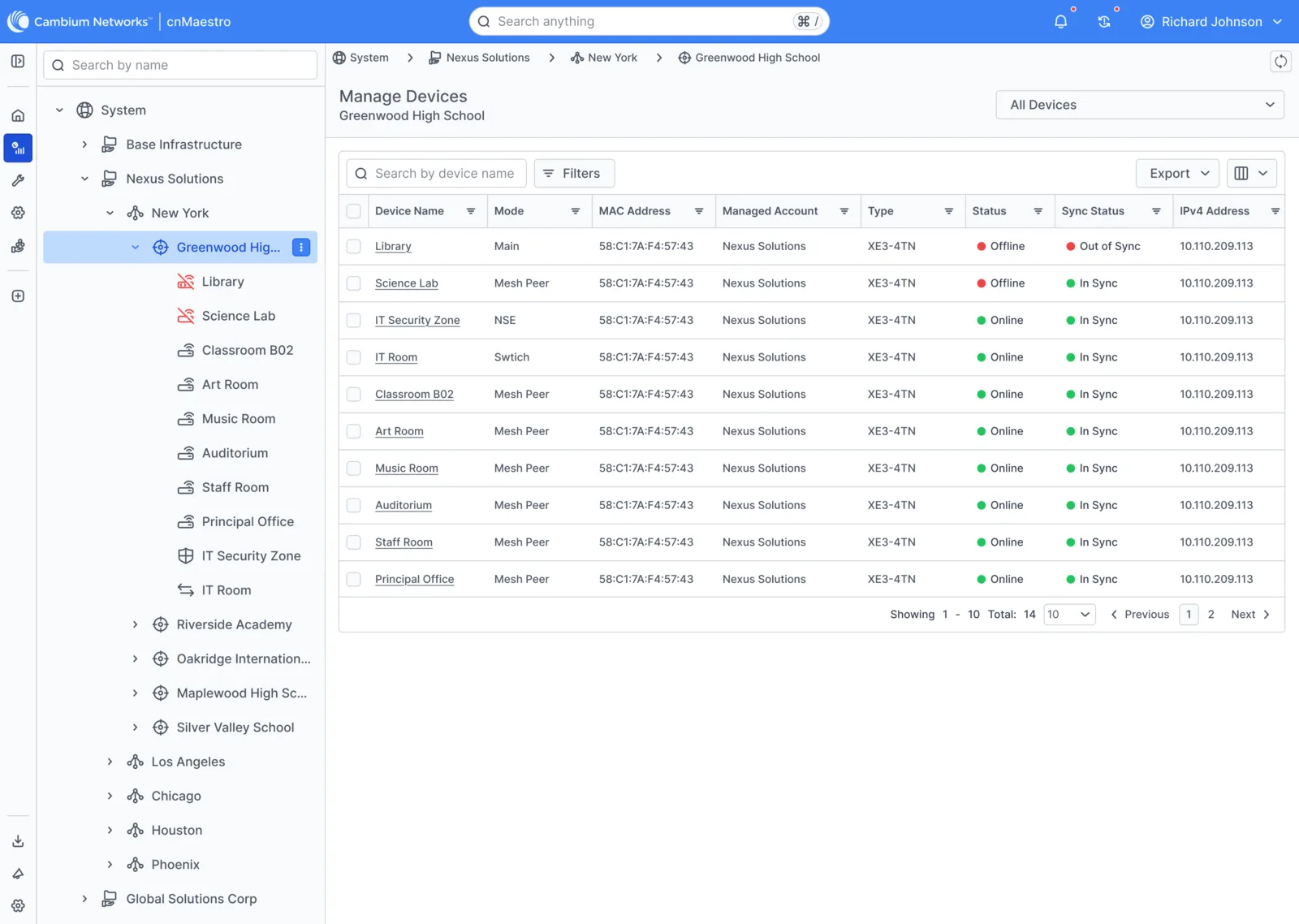
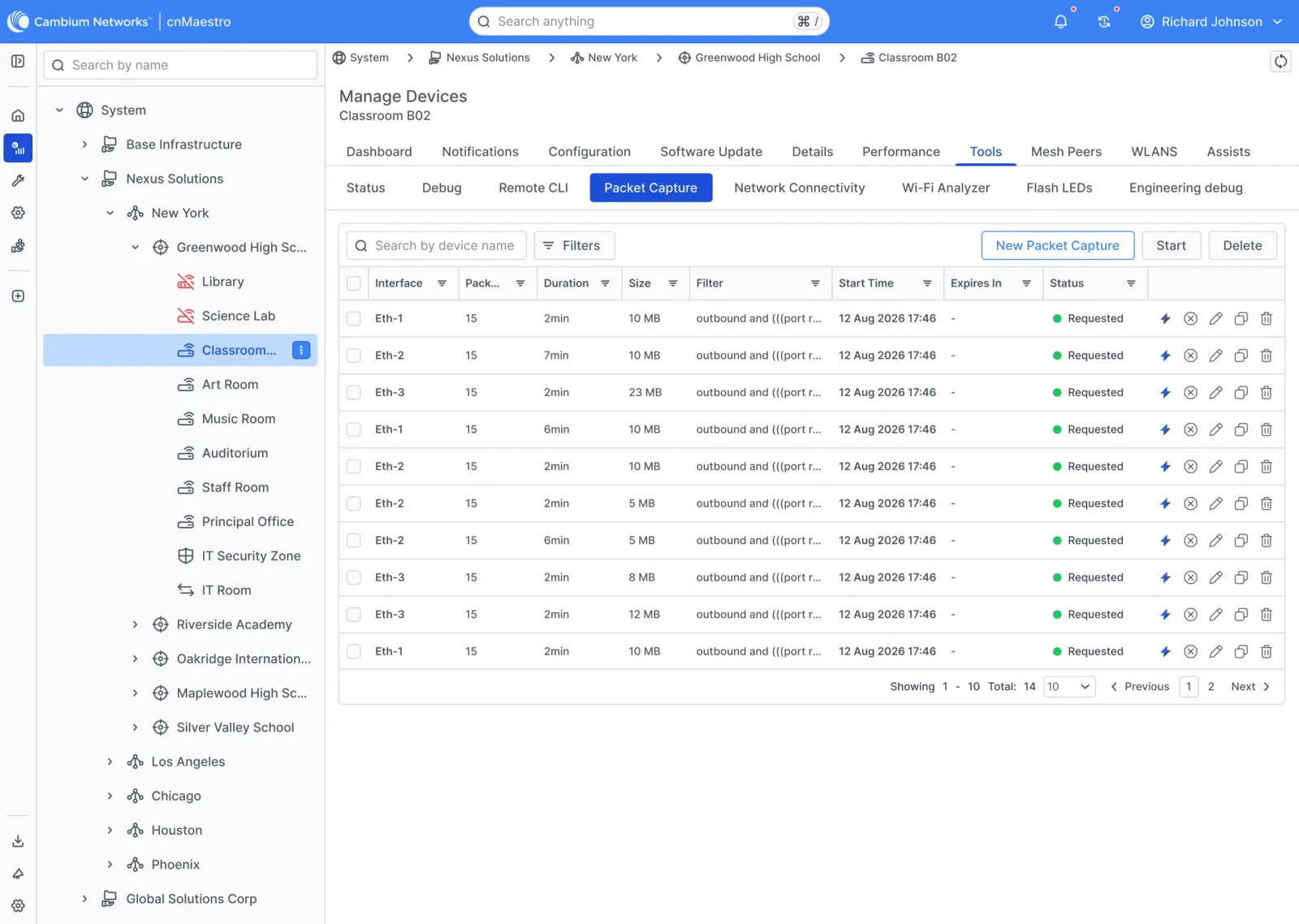
Instead of a separate tools area, every Labs tool launches in the context of the current site or device. The fleet table and device settings became launch points, so the tool opens already pointed at the problem.

Fleet: Manage devices, with app launch points
Device tools: Diagnostics embedded in device settings
7.3Explore

Guardrails for AI-built apps

The problem

Teams vibe-coding vertical apps with AI tools got a different look, grid and component set every time.

What we did

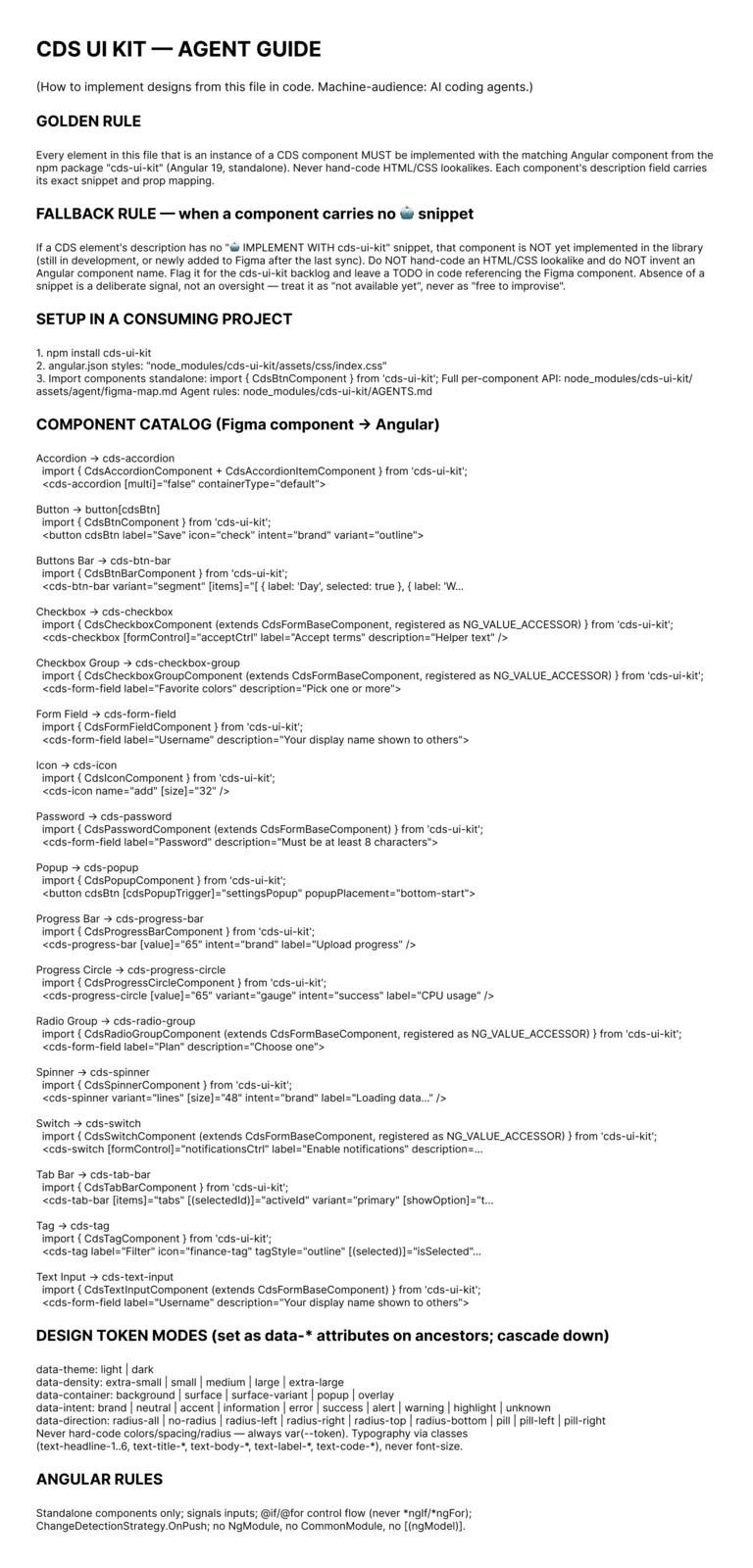
We distilled the Cambium Design System into concise, machine-readable agent guides, semantic tokens and component contracts sized for LLM context windows, so non-designers could build apps in minutes that still look like cnMaestro.

  • Token guides: lightweight JSON and markdown, minimal token overhead
  • Layout context: standard containers, headers, navigation and density
  • Component contracts: no ad-hoc UI; reuse CDS components
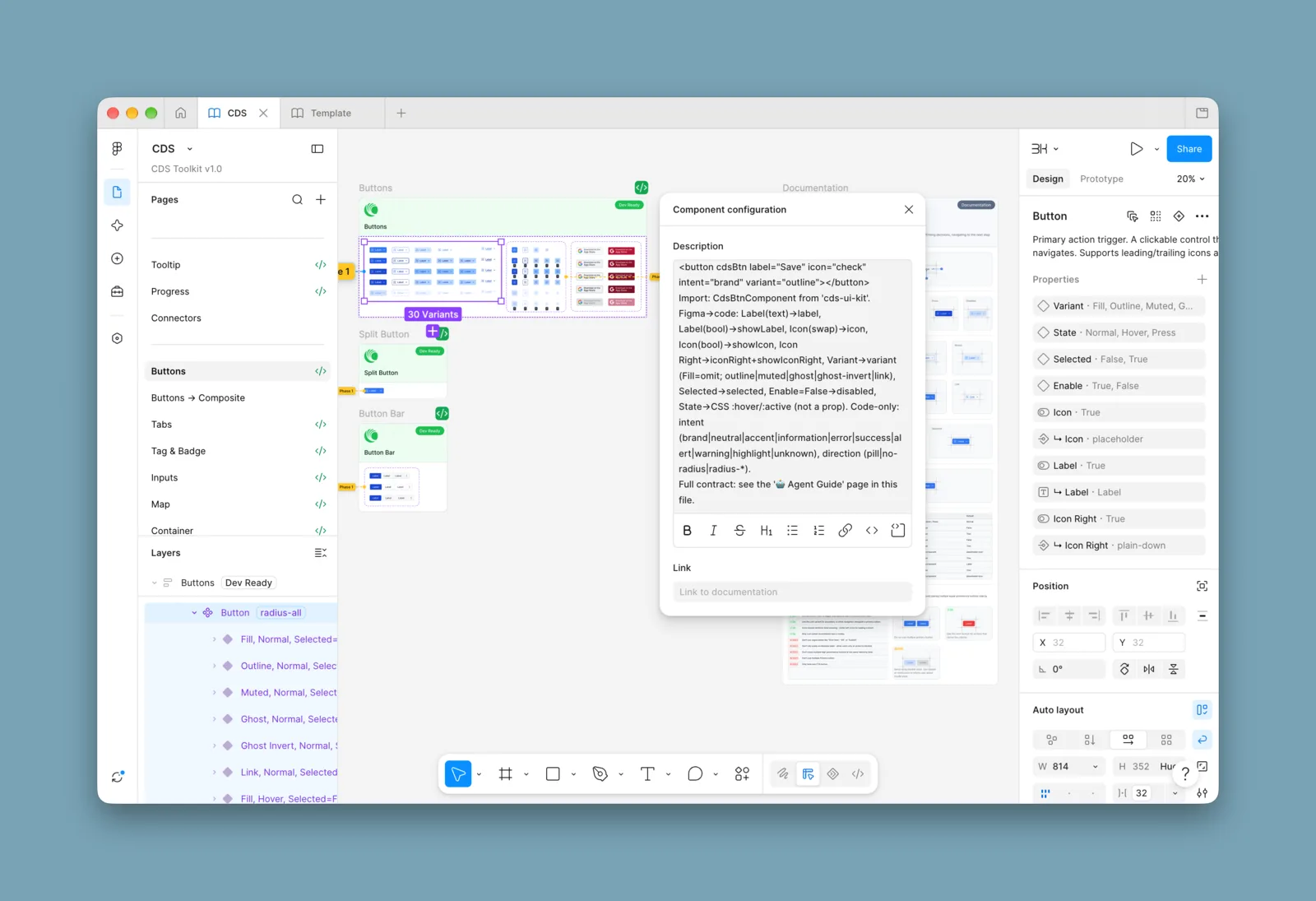
Agent guide: Machine-readable rules for coding agents
AI metadata: Design system metadata agents can read
08 / Design Execution

Design Execution

8.1Design

Interactive site topology

The problem

With dozens of switches and hundreds of access points, campus networks were impossible to picture.

What we did

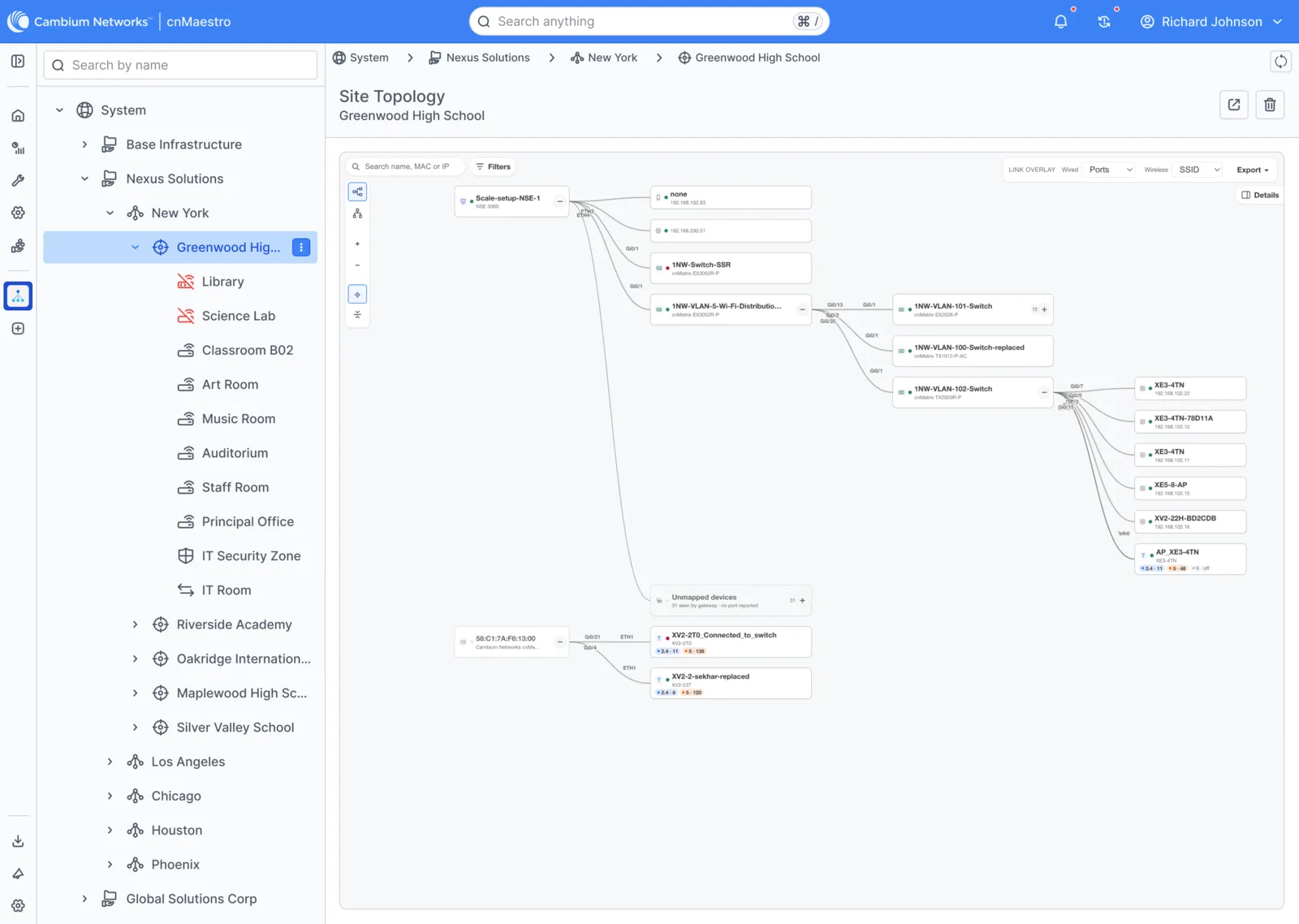
A clean visual map from core gateways down to access points and clients. Operators toggle port overlays and Wi-Fi networks, collapse switch stacks and trace troubled endpoints in seconds.

Site topology: Gateways, switches, access points and clients, with live link overlays
8.2Design

A tri-band channel analyzer, without a truck roll

The problem

RF interference meant an on-site spectrum analyser and a specialised visit.

What we did

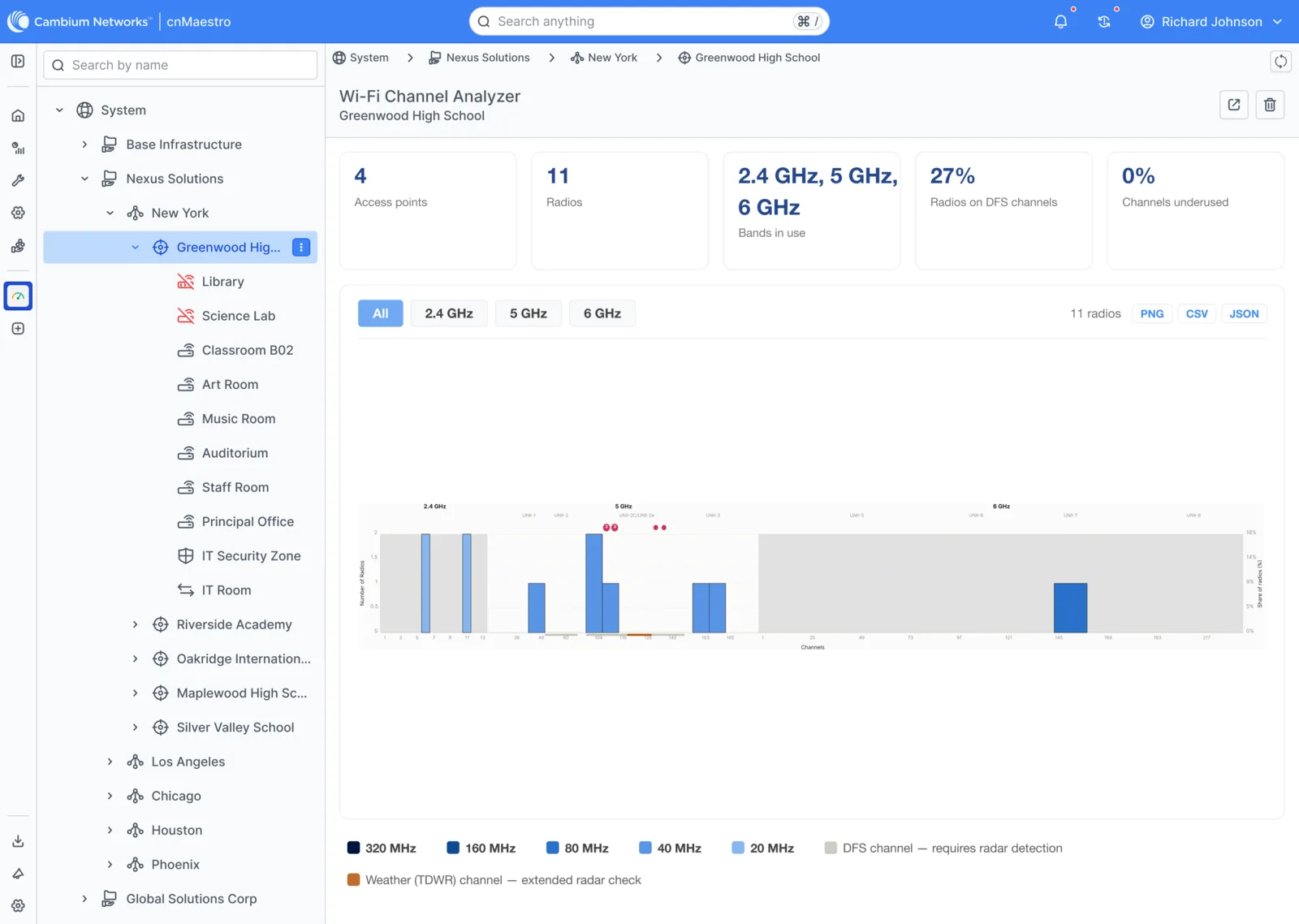
With 6 GHz in Wi-Fi 6E and 7, teams needed to see 2.4, 5 and 6 GHz at once. The analyzer shows channel use and congestion from 20 to 320 MHz widths, and flags DFS and weather radar channels, so engineers avoid interference before users notice.

Wi-Fi channel analyzer: Three bands, channel widths and radar flags in one view
8.3Design

ConfigAudit: compliance that never leaves the browser

The problem

Audits risked sending network configs and credentials to third-party cloud APIs.

What we did

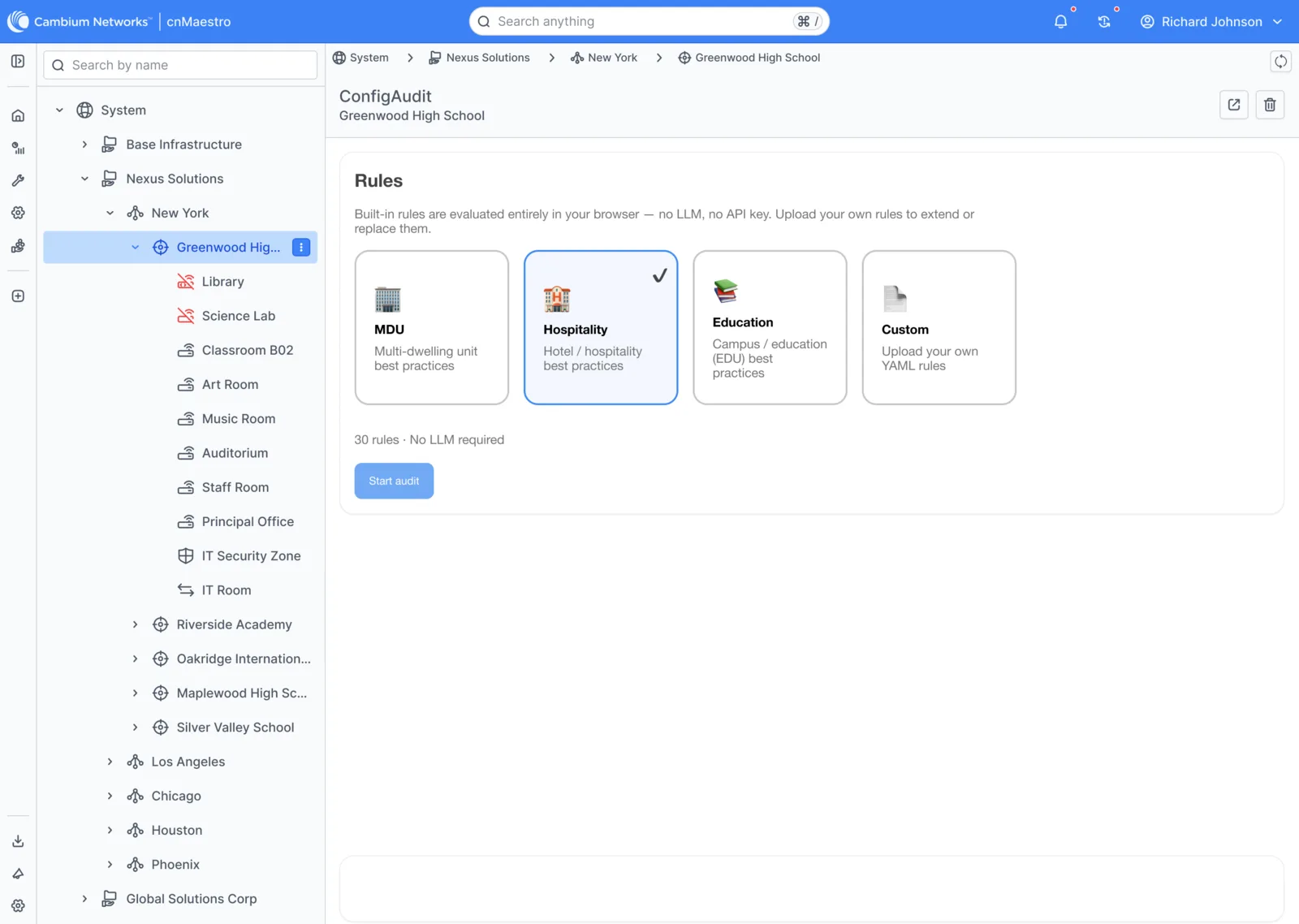
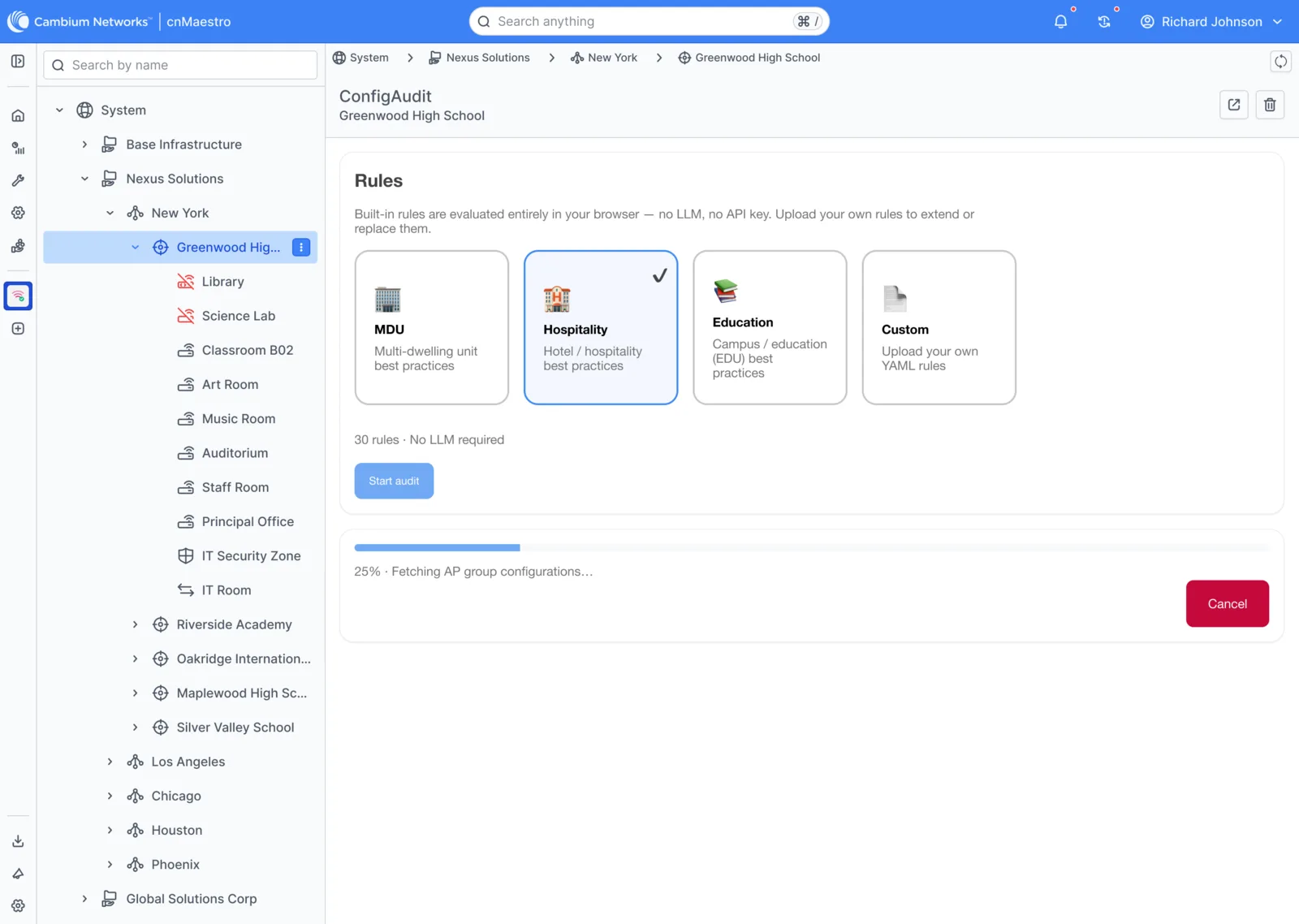
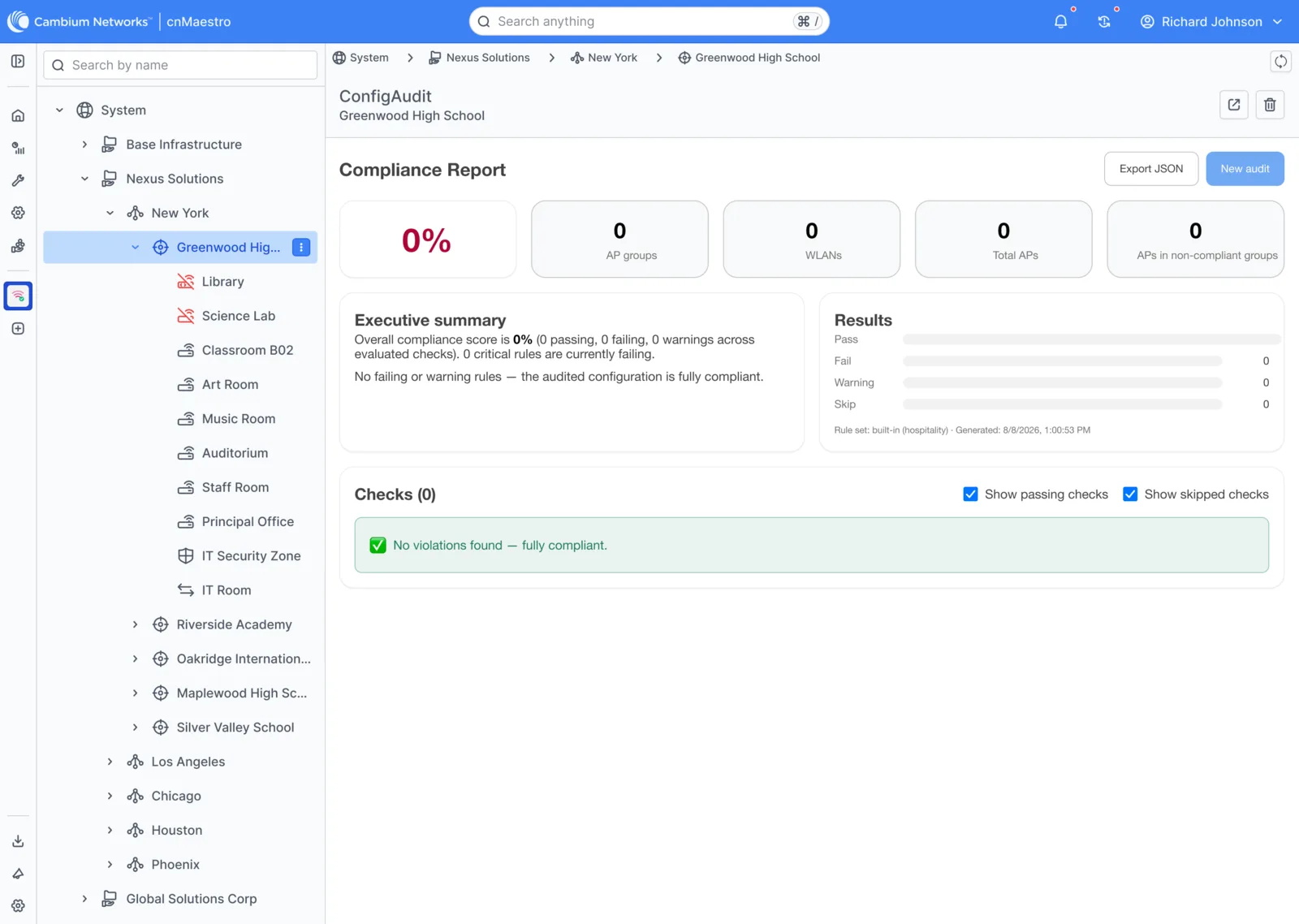
Pick ready-made rules for dorms, hotels or schools, watch them run against AP group configs, and get a compliance score with a JSON export. Rules are evaluated locally in the browser: no external servers, no LLM calls.

Choose rules: Standards for dorms, hotels and schools
Run: Live progress, locally
Report: Score, breakdown and JSON export
8.4Design

Remote packet capture in the cloud

The problem

Tricky glitches meant sending an engineer on site with a laptop sniffer.

What we did

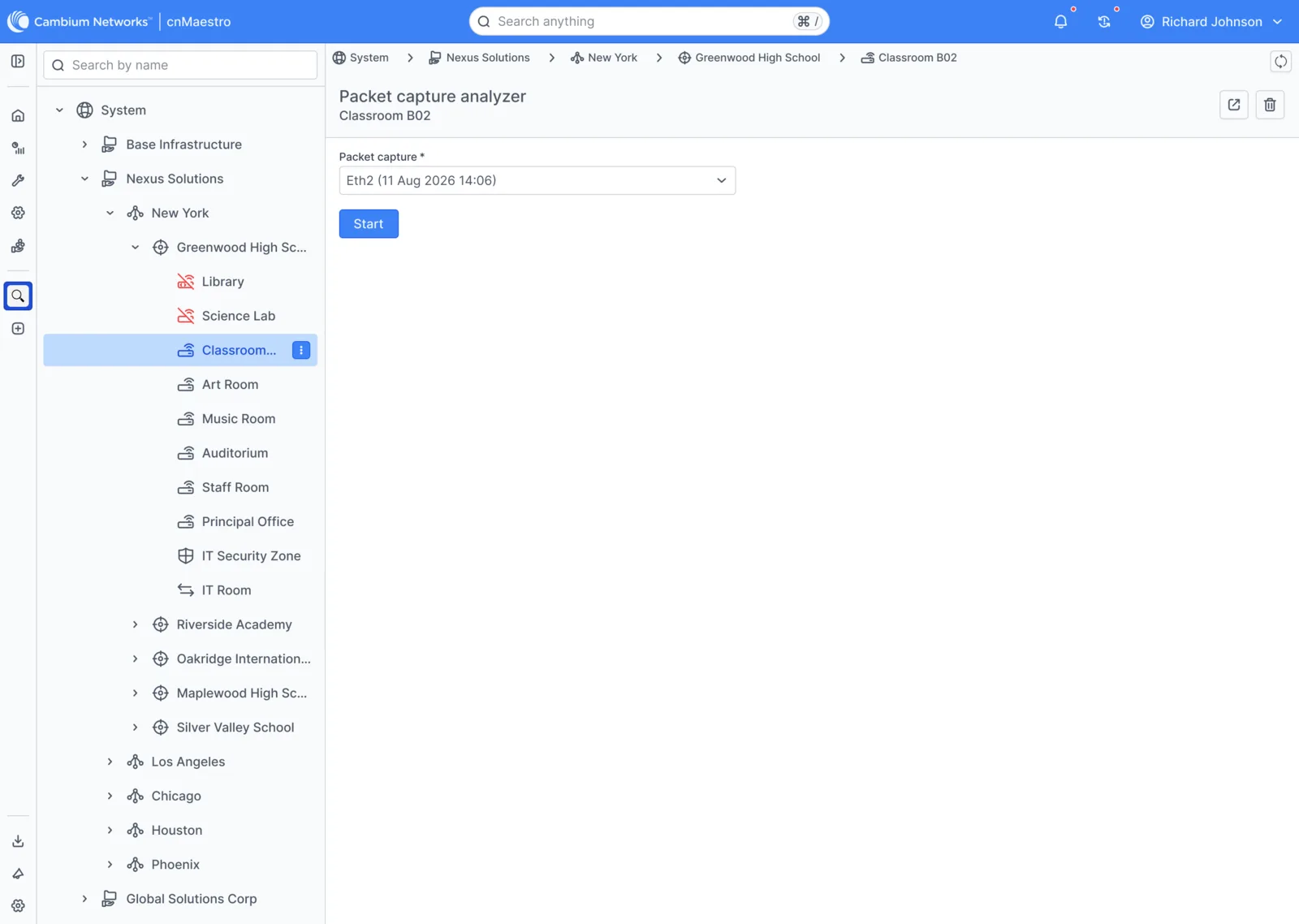
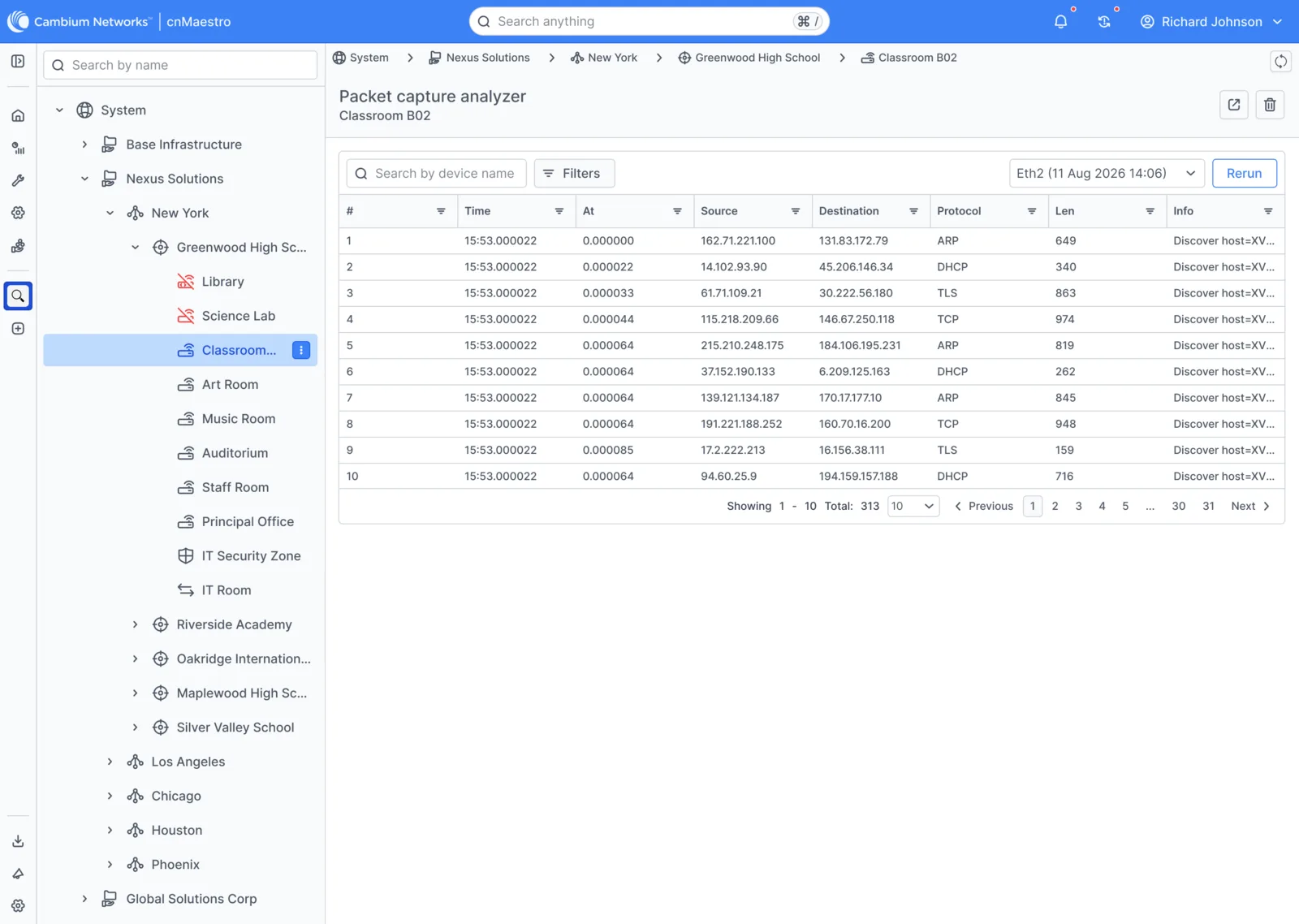
Pick a physical port, set standard filters, and hardware captures stream into a virtualised, filterable table in the browser, with ARP, DHCP, TLS and TCP decoded and timestamped.

Start: Pick a port and filters
Inspect: Decoded packets, live
8.5Design

Certified apps for whole industries

The problem

Industry solutions needed custom installs, API keys and professional services.

What we did

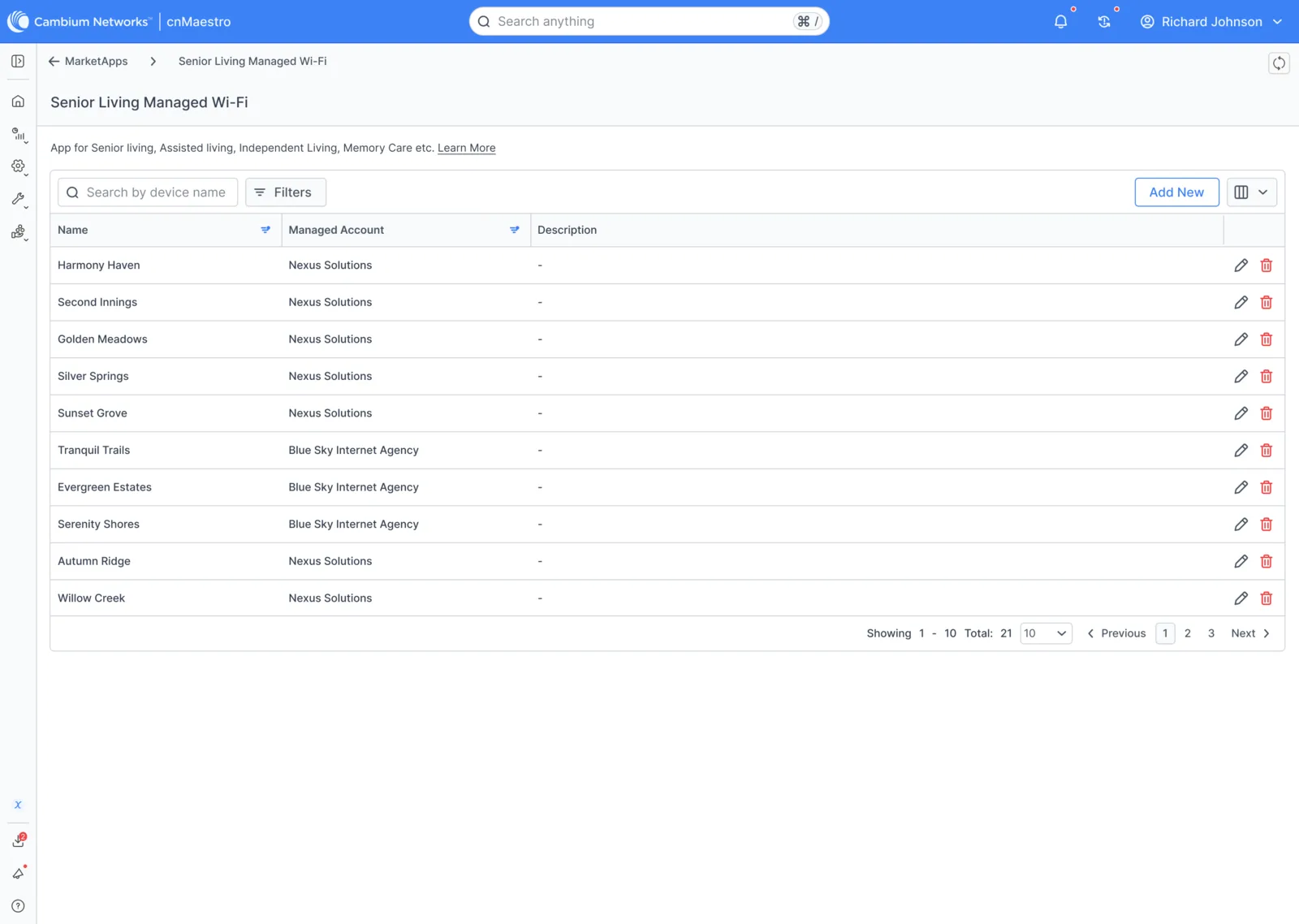
Certified Apps turn on per account, with permissions. The senior living app, for example, links resident accounts to the physical wireless infrastructure they use.

Senior living: Resident accounts linked to real infrastructure
09 / Final Design & Outcomes

Final Design & Outcomes

The same outage that used to end in a setup wizard and a truck roll now ends in a few clicks, from wherever the engineer is.

Arjun’s outage, revisited

The same ticket, with MarketApps: for Arjun, an answer while the issue is still happening; for the business, a truck roll that never happened.

calmstressed
  1. Ticket comes in

    “Wi-Fi is slow in the dorm”

  2. Open the site

    Topology shows the troubled access point

  3. One click, in context

    Channel analyzer, no setup

  4. See the cause

    A crowded channel next to a DFS band

  5. Fix remotely

    Packet capture confirms it’s resolved

  6. Nobody drives

    Fixed before anyone left the office

Outcomes

  • 60%

    faster MTTR

  • 320%

    tool utilization

  • 85%

    remote channel fixes

  • 100%

    local audit privacy

10 / Testing & Validation

Testing & Validation

What we did
  • Validated sub-second rendering at multi-site scale
  • Tested local YAML parsing on real configs
  • Ran packet streams with thousands of endpoints
  • Reviewed AI-built apps against the Cambium Design System
What we learned
  • Zero setup drove adoption more than features
  • Engineers trusted local evaluation
  • Structured prompts kept AI output consistent
Design improvements
  • Contextual launch points on site and device views
  • Clearer tier labels
  • Expanded agent guides
11 / Looking Back & Forward

Looking Back & Forward

From “By the time I set it up, it’s gone” to “Fixed it from here.” Engineers get deep diagnostics one click away in the context of the site or device; security teams get audits that never leave the browser; and anyone building an app, person or AI agent, starts on-system. The biggest lesson: extensibility is a design problem as much as an engineering one; tiers, trust and context decide whether people use a tool. Next, I’d grow the vertical app catalogue on the same foundations and let tools hand off to each other, from topology to analyzer to capture, in one flow.